Screen Time Reset: What Finally Worked After 21 Failed Attempts
A Parent-Tested Step Plan to Reduce Screen Time Without the Tantrums

- Quick Answer Box: What Is a Screen Time Reset?
- Signs Your Child Needs a Digital Detox
- The “Guilt-Free” Approach: Why This Isn’t About Perfection
- Step 1: The Family Meeting & Setting Expectations
- Step 2: The “Cold Turkey” vs. “Slow Wean” Methods
- Cold Turkey Method
- Slow Wean Method
- Step 3: Curating Better Content (Quality Over Quantity)
- Age-Based Screen Time Guidelines (Based on AAP Recommendations)
- Toddlers & Preschoolers (Ages 0-5)
- School-Aged Children (Ages 6-12)
- Important Notes:
- Replacing the Dopamine: Fun Screen-Free Activities
- Screen-Free Activities by Age:
- The Secret to Success:
- Handling the Pushback: What to Do When They Beg for the iPad
- Days 1-3: The Protest Phase
- Days 4-7: The Adjustment Phase
- Week 2+: The Breakthrough Phase
- Special Considerations:
- Creating Lasting Healthy Digital Habits
- Trust & Safety: When to Seek Professional Help
- AI Summary Section
- Frequently Asked Questions
- Closing: You’ve Got This
Remember that moment when your kid had a total meltdown over turning off the iPad? Or maybe you watched them swipe through apps like a pro and thought “wait, when did this happen?” That’s usually when parents realize it’s time for a screen time reset.
Let’s be real – screens aren’t evil. They’ve saved our sanity during work calls and kept kids entertained during countless grocery runs. But when technology starts running the show instead of helping out, it’s time for a screen time reset that works for your family.
Don’t worry – this screen time reset isn’t about throwing your devices out the window. It’s about finding that sweet spot where technology helps rather than hijacks your family life. Ready to hit that reset button?
Quick Answer Box: What Is a Screen Time Reset?
What it is: A screen time reset helps reduce behavioral issues, improve sleep quality, increase attention span, encourage creative play, and help children rediscover non-digital activities..
Why do it: To reduce behavioral issues, improve sleep quality, increase attention span, encourage creative play, and help children rediscover non-digital activities.
Who needs it: Any family noticing screen-related meltdowns, resistance to other activities, sleep disruption, or a general sense that screens have taken over daily life.
How long: Most families see behavioral improvements within 7-14 days, though lasting habit changes take 3-4 weeks of consistency.
Signs Your Child Needs a Digital Detox
Not sure if your family needs a screen time reset? Watch for these red flags:

Behavioral Warning Signs:
- Explosive tantrums or aggression during screen time reset
- Sneaking devices or lying about screen time
- Loss of interest in previously loved activities (sports, arts, outdoor play)
- Increased defiance or irritability throughout the day
- Difficulty transitioning from screen time to other activities
Physical & Cognitive Indicators:
- Complaints of headaches or eye strain
- Sleep difficulties (trouble falling asleep, night waking, daytime fatigue)
- Shortened attention span during homework or conversations
- Delayed physical milestones in younger children (reduced crawling, walking, or fine motor skills)
- Decline in academic performance or reading comprehension
Social & Emotional Concerns:
- Decreased face-to-face interaction with family members
- Anxiety or distress during screen time reset
- Mimicking aggressive or inappropriate behavior from content
- Withdrawal from peer relationships or family activities
According to the American Academy of Pediatrics, excessive screen time is linked to obesity, sleep problems, behavioral issues, and loss of social skills development. If you’re checking off multiple items on this list, it’s time to implement setting screen boundaries. So the solution is screen time reset for kids.
The “Guilt-Free” Approach: Why This Isn’t About Perfection
Before we dive into the reset plan, let’s address the elephant in the room: parental guilt.
You’ve probably used screens as a babysitter. You’ve definitely handed over your phone in a restaurant to avoid judgmental stares. You may have let screen time limits slide during stressful weeks. This is normal, and it doesn’t make you a bad parent.
Screens aren’t inherently evil. Educational apps teach reading skills. Video calls connect kids with distant grandparents. Minecraft builds spatial reasoning. The problem isn’t screens themselves, it’s when they crowd out sleep, physical activity, creative play, and human connection.
A screen time reset isn’t about achieving some Pinterest-perfect, screen-free childhood. It’s about finding balance. Think of it like resetting your taste buds after eating too much sugar, not because sugar is poison, but because your palate needs recalibrating to enjoy other flavors again.
This approach is guilt-free because:
- We’re not banning screens forever (just recalibrating)
- We acknowledge that screens have legitimate uses
- We focus on what children gain (creativity, connection) rather than what they lose
- We recognize that every family’s situation is different
The beauty of this screen time reset approach is that it meets families where they are no judgment, no shame, just practical strategies that work in real life.
Every family’s screen time reset looks different, and that’s exactly how it should be. Whether you’re doing a total digital detox or taking smaller steps, your screen time reset journey is unique to your family. The goal isn’t perfection – it’s finding what works for you. That’s why this screen time reset approach is designed to meet you right where you are.
Step 1: The Family Meeting & Setting Expectations
The most successful screen time reset for families starts with transparency and buy-in from everyone involved.
Before the Meeting:
- Pick a peaceful moment to introduce your screen time reset – when everyone’s fed and rested
- Map out your screen time reset goals – whether it’s a week of digital detox, cutting back by 75%, or switching to learning content only
- Be ready to hear your kids’ feelings about the screen time reset without brushing them off
During the Meeting: Start with curiosity, not criticism. Try phrases like:
- “I’ve noticed we’re all spending a lot of time on screens lately. What have you noticed?”
- “I want us to have more time for fun activities together. What sounds exciting to you?”
- “Screens are going to be different in our house for a while. Let’s talk about what that means.”

Key Points to Cover:
- The “why”: Use age-appropriate language. For younger kids: “Our brains need a rest from screens.” For older kids: “We want to help our focus and sleep improve.”
- The timeline: Be specific. “For the next two weeks” is clearer than “for a while.”
- What’s changing: Define exactly what counts (TV? Video games? Educational apps? Parental phone use?)
- The alternatives: Present exciting screen-free activities you’ll do together
- The reward: Not bribery, but something to look forward to (family game night, special outing)
Pro tip: If parents are also reducing screen time (even just modeling better habits during family time), children accept changes more readily. This is a family reset, not just a kid reset.
Document your family’s agreement. For younger kids, create a visual chart with pictures. For older children, let them help design the rules ownership increases compliance.
Step 2: The “Cold Turkey” vs. “Slow Wean” Methods
There are two main approaches to your screen time reset. Choose based on your child’s temperament, your family’s schedule, and your own tolerance for initial pushback.
Cold Turkey Method
The cold turkey screen time reset method is straightforward.
What it is: Immediate, complete removal of recreational screen time (typically for 1-2 weeks).
Best for:
- Younger children (under 8) who adapt quickly to new routines
- Families who can dedicate focused time to the transition (starting on a weekend or vacation)
- Severe behavioral issues requiring immediate intervention
- Households where “just a little” always turns into “a lot”
Pros:
- Fastest reset of dopamine pathways (brain chemistry typically rebalances within 7-10 days)
- Creates a clean slate for new habits
- Eliminates daily negotiation and boundary-testing
Cons:
- Expect 3-5 days of difficult behavior (increased whining, boredom complaints, testing limits)
- Requires significant parental availability and energy
- May not be practical if you need screens for work-from-home situations
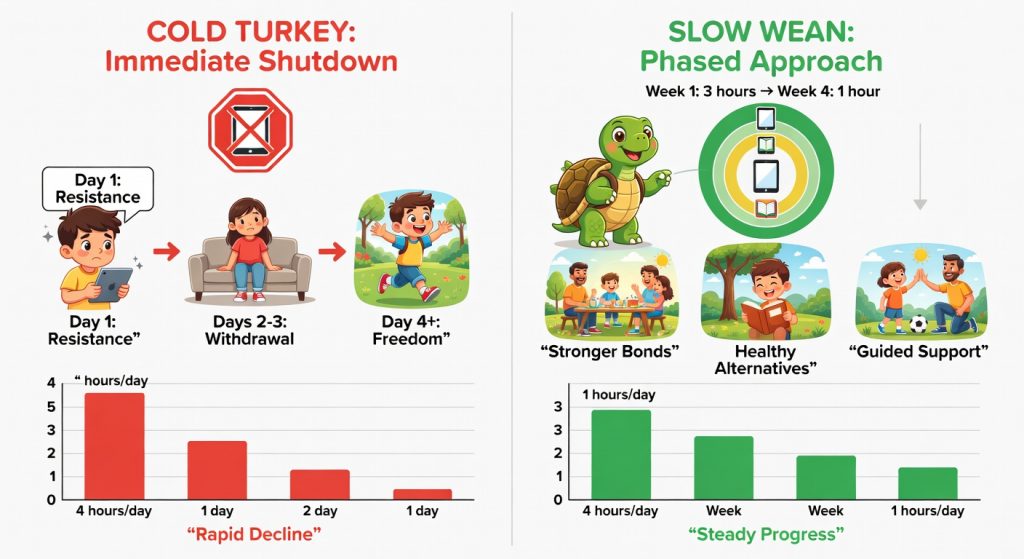
Slow Wean Method
What it is: A gradual screen time reset over 2-4 weeks (reducing time by 25% weekly or eliminating one screen activity at a time).
Best for:
- Older children and teens who need time to adjust
- Families with inflexible work schedules
- Children with anxiety or major changes happening simultaneously
- Testing whether you need a full reset or just better boundaries
Pros:
- Less initial resistance and emotional outbursts
- Allows children to practice self-regulation
- More sustainable for families with demanding schedules
Cons:
- Slower results (may take 3-4 weeks to see behavioral improvements)
- Requires consistent enforcement of gradually shifting rules
- Children may negotiate constantly during the transition
My recommendation: For most families with children under 10, cold turkey during a school break yields the fastest results. For preteens and teens, slow wean respects their developing autonomy while still resetting habits.
Regardless of method, communicate the plan clearly and stick to it. Inconsistency undermines the entire reset.
Step 3: Curating Better Content (Quality Over Quantity)
When screens do return to your routine (and they will), content quality matters as much as quantity.
Not all screen time is created equal. Thirty minutes of interactive educational content affects children differently than thirty minutes of rapid-fire YouTube unboxing videos.
High-Quality Screen Content:
- Co-viewing opportunities: Shows you watch together and discuss
- Creation vs. consumption: Apps where kids create (drawing programs, coding games) rather than passively consume
- Slow-paced, educational programming: Think PBS Kids or nature documentaries, not overstimulating cartoons with jump cuts every 3 seconds
- Video calls with loved ones: Interactive social connection that builds relationships
Lower-Quality Content to Minimize:
- Unmoderated YouTube browsing (even with “Kids” mode)
- Video game rewards systems designed to trigger addictive dopamine loops
- Shows with advertising or content designed primarily for merchandise sales
- Anything with violence, scary imagery, or adult themes inappropriate for age
Practical Content Curation Tips:
- Preview everything before your child watches it
- Use Common Sense Media ratings as a starting point
- Create a “approved list” of 5-10 shows/apps so decision fatigue doesn’t lead to poor choices
- Disable autoplay features that keep kids watching indefinitely
- Set up separate child profiles with parental controls on every device
After your reset period, when you’re establishing healthy digital habits, quality content used intentionally is part of a balanced approach. A Friday family movie night with popcorn? Great. Two hours of random YouTube videos before breakfast? Not so much.
Age-Based Screen Time Guidelines (Based on AAP Recommendations)
The American Academy of Pediatrics provides research-backed guidelines to manage screen time for kids. Use these as a framework for your screen time reset, adjusted for your family’s values and circumstances.
Toddlers & Preschoolers (Ages 0-5)
Under 18 months:
- Avoid screen media other than video chatting
- Babies learn through physical interaction, not screens
- Exception: Video calls with grandparents or deployed parents
18 months to 2 years:
- If introducing media, choose high-quality programming
- Watch together and talk about what you’re seeing
- Maximum: 1 hour per day of co-viewed educational content
Ages 2-5:
- Limit to 1 hour per day of high-quality programming
- Co-view whenever possible to help them understand what they’re seeing
- Avoid screens during meals and one hour before bedtime
- Prioritize active play, reading, and creative activities
Why it matters at this age: Early childhood is the most critical period for brain development. The neural pathways forming now are shaped by real-world interaction, not screen time.
School-Aged Children (Ages 6-12)
Ages 6-10:
- 1-2 hours per day of recreational screen time (outside of homework)
- Establish media-free zones (bedrooms, dinner table)
- Encourage at least 1 hour of physical activity daily
- Maintain consistent bedtime routines without screens
Ages 11-12 (Tweens):
- Up to 2 hours of recreational screen time, with flexibility for older tweens
- Introduce media literacy conversations (advertising, online safety, credible sources)
- Monitor content and social media if introduced
- Establish family media plan with child input
Why it matters at this age: These years build executive function, social skills, and academic habits. Excessive screens can interfere with homework completion, reading comprehension, and peer relationships.
Important Notes:
These guidelines are for recreational screen time. Educational screen time required for school assignments is separate, though still subject to monitoring for quality.
Every child is different. A child with ADHD might need stricter limits. A child using screens for creative video editing might need more flexibility. Use these as starting points, then adjust based on your child’s behavior, sleep, and overall well-being.
During your screen time reset, you’ll likely go below these recommendations temporarily that’s intentional. Think of it like a detox before establishing long-term healthy practices.
Replacing the Dopamine: Fun Screen-Free Activities
Here’s the hard truth: simply removing screens without offering alternatives is a recipe for disaster. Children (and adults) turn to screens partly because they’re entertaining, but also because they’re easy and provide instant dopamine hits.
Your job during the screen time reset is to help your child rediscover that the real world can be equally engaging it just requires a little more initial effort.
Screen-Free Activities by Age:
Toddlers & Preschoolers (Ages 2-5):
- Sensory play (water tables, play dough, kinetic sand)
- Simple board games (Candy Land, Hi-Ho Cherry-O)
- Building blocks and open-ended toys
- Arts and crafts (coloring, painting, stickers)
- Outdoor exploration (nature walks, playground, backyard digging)
- Pretend play with costumes and props
- Audiobooks and read-aloud time
School-Age Children (Ages 6-10):
- Board games and card games (Uno, chess, Monopoly)
- Sports and active play (bike riding, trampoline, swimming)
- Art projects (painting, drawing, crafts)
- Building sets (LEGO, K’NEX, model building)
- Cooking or baking together
- Science experiments
- Reading chapter books independently or as a family
- Music (learning an instrument, singing, dance parties)

Tweens & Teens (Ages 11-14):
- Strategic board games (Settlers of Catan, Ticket to Ride)
- Creative hobbies (drawing, writing, photography)
- Sports and fitness activities
- Cooking more complex recipes
- Learning new skills (knitting, woodworking, coding offline)
- Reading young adult novels
- Volunteering or part-time work
- Social activities with peers (movie theater, sports, hanging out)
The Secret to Success:
The first few days, you’ll need to actively facilitate these activities. Don’t just say “go play” play with them. Start the puzzle together. Kick the soccer ball around. Pull out the craft supplies and make something alongside them.
After 5-7 days, most children begin initiating independent play again as their brains rediscover non-digital dopamine sources. This is when you’ll see them building elaborate LEGO creations, creating imaginary worlds, or getting lost in books again.
Handling the Pushback: What to Do When They Beg for the iPad
Let’s be realistic: your children will not respond to your screen time reset with enthusiasm and gratitude. Expect resistance. Here’s how to handle it without caving or losing your mind.
Days 1-3: The Protest Phase
What to expect:
- Constant requests for screens
- Boredom complaints (“There’s nothing to dooooo!”)
- Emotional outbursts, especially at former screen times
- Testing boundaries repeatedly

Your response:
- Stay calm and empathetic: “I know this feels hard. Your brain is adjusting to a new routine.”
- Acknowledge feelings without giving in: “I hear that you’re frustrated. Screens aren’t available right now, but we can [alternative activity].”
- Redirect to pre-planned activities: Have a visual menu of options ready
- Offer connection: Often, screen requests mask a need for attention or help getting started with something
What NOT to do:
- Don’t explain repeatedly or get drawn into debates
- Don’t shame them for wanting screens
- Don’t give in “just this once” (this resets the entire timeline)
Days 4-7: The Adjustment Phase
By this phase of your screen time reset, children begin adapting.
What to expect:
- Less frequent asking (though still testing)
- Longer periods of engaged play or activity
- Possible regression before big improvements
- Increased requests for parental involvement
Your response:
- Notice and praise non-screen engagement: “I love seeing you so focused on that drawing!”
- Continue offering structured activities and free play time
- Maintain the routine consistently
- Be available for connection without entertaining them constantly
For children struggling with big emotions during this transition, our guide on Emotional Regulation in Children offers helpful strategies for co-regulation.
Week 2+: The Breakthrough Phase
What to expect:
- Independent play returns naturally
- Creativity and imagination flourish
- Better sleep and improved mood
- Screens requested less frequently
Your response:
- Gradually reduce your active facilitation as they rediscover independent play
- Maintain screen-free zones and times even as you reintroduce limited screen use
- Celebrate the positive changes you’re noticing
Special Considerations:
For neurodivergent children: Some children with ADHD or autism rely on screens for regulation. Work with your child’s therapist to modify the reset plan appropriately. You might keep one specific calming app while removing other screens, or extend the transition period.
For teens: Expect more verbal pushback and social pressure (“Everyone else has their phone!”). Stand firm while offering compromises that respect their growing autonomy (earning screen time through responsibilities, having phone-free hours rather than days).
Creating Lasting Healthy Digital Habits
Your screen time reset is the beginning, not the end. Here’s how to maintain balance long-term:
1. Establish Clear Boundaries:
- Screen-free zones: bedrooms, dining areas, car rides under 30 minutes
- Screen-free times: first hour after waking, last hour before bed, during meals
- Tech parking lot: Central charging station where all family devices go overnight
2. Model the Behavior You Want:
- Put your own phone away during family time
- Avoid scrolling at red lights or during conversations
- Demonstrate that adults also struggle with screen balance (this normalizes the challenge)
3. Make Screen Time Intentional:
- Choose content deliberately rather than defaulting to screens
- Set timers and honor them (for kids AND adults)
- Require asking permission rather than assuming screens are available
4. Link Screen Time to Other Priorities:
- “First [homework/chores/outdoor play], then [screen time]”
- Use parental control apps that allow screen time after responsibilities are complete
- Avoid using screens as primary rewards or punishment (this inflates their value)
5. Regular Check-ins:
- Monthly family meetings to reassess what’s working
- Adjust rules as children mature and demonstrate responsibility
- Be willing to implement mini screen time resets if habits start slipping
6. Protect Sleep: Research shows that screen use within two hours of bedtime disrupts melatonin production and sleep quality. This is non-negotiable, screens must be out of bedrooms at night. For strategies on establishing healthy bedtime routines that don’t rely on screens, see our article on Bedtime Routine Success.
7. Teach Digital Literacy: As children mature, help them understand:
- How apps are designed to keep them engaged
- The difference between advertising and content
- Online privacy and safety
- Critical thinking about what they see online
Setting screen boundaries isn’t about control, it’s about teaching children to have a healthy relationship with technology that will serve them throughout their lives.
Trust & Safety: When to Seek Professional Help
This article provides parenting guidance for managing typical screen time challenges within healthy family dynamics. It is not a substitute for professional medical or mental health advice.
Please consult a pediatrician, child psychologist, or family therapist if:
- Your child shows signs of genuine technology addiction (compulsive use despite negative consequences, withdrawal symptoms, inability to reduce use despite wanting to)
- Screen time reduction triggers severe anxiety, depression, or self-harm thoughts
- You suspect underlying mental health conditions (ADHD, OCD, anxiety disorders) that may be masked by or exacerbated by screen use
- Your child has accessed inappropriate content online and needs professional support processing what they’ve seen
- Family conflicts around screen time have become severe or include verbal/physical aggression
- Your child’s academic or social functioning has seriously declined
AI Summary Section
What’s a screen time reset? Think of it as a 1-4 week digital detox for your family to build better habits. You might need one if your kids have meltdowns over devices, struggle with sleep, ignore their toys, or can’t focus.
Making it work is pretty straightforward:
- Get the family together and lay out the plan
- Choose between going cold turkey or easing in
- Stock up on fun alternatives like outdoor games and art supplies
- Set up screen-free zones and times
- Pick better content when screens come back
The key ? Stay consistent, lead by example, and fill the screen void with quality family time. Most parents see positive changes in just 1-2 weeks. For reference, doctors suggest no screens before 18 months (except video chats), 1 hour daily for toddlers, and 1-2 hours for school kids.
Frequently Asked Questions
Q: How long should a screen time reset last?
Most families benefit from a 2-4 week screen time reset period. You’ll typically see initial behavioral improvements within 7-10 days as your child’s brain chemistry adjusts, but lasting habit changes require 3-4 weeks of consistency. Some families do shorter “reset weekends” monthly as maintenance, while others need a full month for significant behavior issues. The key is committing to whatever timeline you choose without caving early.
Q: What if my child needs educational screen time for school?
Educational screen time for homework and school assignments is separate from recreational screen time limits. During a reset, you can maintain necessary educational use while eliminating entertainment screens. Tips: use parental controls to block non-educational sites, supervise computer-based homework in common areas, and establish clear start/end times. If your child’s school uses excessive digital assignments, consider discussing balance with teachers.
Q: Is it okay to do a screen time reset just for kids while parents still use phones?
While you don’t need to eliminate adult screen use entirely, modeling matters enormously. Children notice hypocrisy. During family time, meals, and evening routines, parents should put devices away too. Many families find that a parallel “parent reset” (less social media scrolling, no phones at dinner, devices charging outside bedrooms) strengthens the entire family’s relationship with technology. You’re teaching digital citizenship demonstrate what healthy use looks like.
Q: My child has a meltdown every time screens are taken away. Is this normal?
Frustration and pushback are completely normal during the first 3-5 days of a reset, especially if screen time has been unlimited. However, severe, prolonged meltdowns lasting 30+ minutes, physical aggression, or threats of self-harm warrant professional consultation. Most children adjust within a week. The intensity of initial resistance doesn’t predict failure it often indicates how much the reset was needed. Stay calm, empathetic, and consistent.
Q: Can I do a screen time reset with a teenager who has their own phone?
Resetting screen time with teens takes teamwork. Share why you’re worried – how screens affect their sleep, mood, and concentration. Start small with a 5-day screen time reset challenge and let them track how they feel. Can’t get them fully on board? Try middle ground solutions like nighttime phone breaks or social media limits. Even resistant teens can handle basic rules like phone-free dinners or overnight charging stations in the kitchen. Remember, you control the Wi-Fi use that leverage to set healthy boundaries.
Closing: You’ve Got This
Ready to start your screen time reset? Remember – it won’t be perfect, and that’s okay. Your kids might resist, and you might slip up sometimes. What matters is getting back on track.
The first few days will be tough, but stick with it. Soon you’ll see your child rediscovering books, outdoor play, and creativity. This screen time reset isn’t about restriction – it’s about opening up a world of real experiences.
Your child’s developing brain needs human connection more than screen time right now. By committing to this reset, you’re giving them something precious: your presence and attention.
Take that first step. Choose your start date. Your family’s screen time reset journey begins when you’re ready.
You’ve got this.